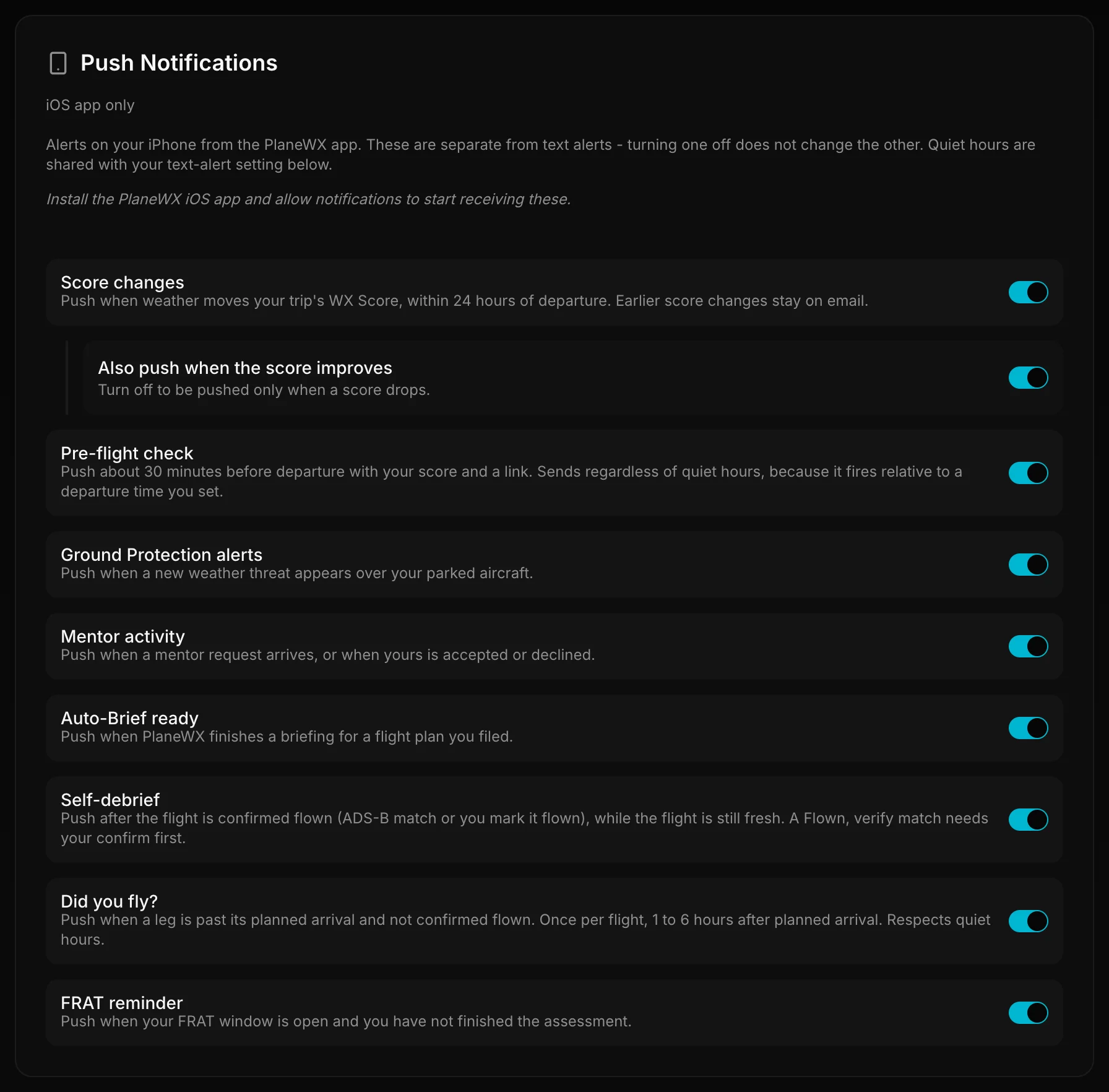
Alerts on your iPhone from the PlaneWX app. They are separate from text (SMS) alerts. Turning one channel off does not change the other.
What you can get
Each line matches a toggle label on the Push Notifications card in Profile.
Score changes When weather moves your trip's WX Score by your alert threshold (default 10 points), and departure is within 24 hours. Earlier score moves stay on email and the in-app bell.
Also push when the score improves Sub-toggle under Score changes. Turn it off to be pushed only when a score drops.
Pre-flight check About 20 to 35 minutes before departure, with your route, current WX Score, and a briefing link. Sends even during quiet hours. Not plan-gated. Separate from the Pro Plus Pre-Flight Text.
FRAT reminder When your FRAT window is open (within about 4 hours of departure, still before departure) and you have not finished the assessment. Quiet hours do not apply.
Readiness check reminder Off by default. When on, at most one push per trip, between 90 and 15 minutes before departure, when your FRAT is more than 3 hours old at that time. Not sent within 20 minutes of a pre-flight message. Quiet hours do not apply. See FRAT: Readiness check reminder.
Auto-Brief ready When PlaneWX finishes a briefing for a flight plan you filed. Auto-Brief itself is Pro Plus.
Self-debrief After the flight is confirmed flown (ADS-B match or you mark it flown), between about 1 and 6 hours after planned arrival, asking how the flight went. Self-debrief needs a confirmed flight; a leg marked Flown, verify needs confirmation first. Quiet hours do not apply. The push is not plan-gated.
Did you fly? For a past-arrival leg PlaneWX has not confirmed Flown, between about 1 and 6 hours after planned arrival. Has its own toggle, separate from Self-debrief. Quiet hours apply. Once you confirm Flown, later pushes for that leg are Self-debrief instead.
Ground Protection alerts When a new weather threat appears over your parked aircraft. Pro Plus (and Enterprise). Respects quiet hours.
Mentor activity When a mentor request arrives, or when yours is accepted or declined. Urgent requests bypass quiet hours. The push itself is not plan-gated.
Group mentions and new badges use the in-app bell, not an iOS push.
How to control them
Open Profile, then the Push Notifications card.
Use each toggle by its exact label: Score changes, Also push when the score improves, Pre-flight check, Ground Protection alerts, Mentor activity, Auto-Brief ready, Self-debrief, Did you fly?, FRAT reminder, Readiness check reminder.
Pushes are iOS app only. Install PlaneWX and allow notifications when prompted.
These are separate from Text Alerts on the same Profile page. Turning a push off does not turn a text off, and the reverse.
Quiet hours are shared with the text-alert setting on that Text Alerts card (Quiet hours start and Quiet hours end). Score changes, Ground Protection, Auto-Brief ready, Did you fly?, and non-urgent Mentor activity respect them. Pre-flight check, FRAT reminder, Readiness check reminder, and Self-debrief do not.
Tap Send test on the Push Notifications card to confirm delivery when the app can receive pushes.
If you missed the permission prompt, open iOS Settings, then Notifications, then PlaneWX, and allow alerts.
Push Notifications settings.
Score changes and the 24-hour rule
Only the Score changes push is limited to within 24 hours of departure. Outside that window, email and the in-app bell still carry score moves. Other push types (pre-flight, FRAT, Pilot re-check, ground, mentor, Auto-Brief, self-debrief, Did you fly?) use their own timing, not that 24-hour gate.
Plan notes
Ground Protection alerts need Pro Plus or Enterprise. The watch and the push both stop if the plan drops below that.
Auto-Brief ready only fires when Auto-Brief runs, and Auto-Brief is Pro Plus.
Pre-flight check, Score changes, FRAT reminder, Readiness check reminder, Self-debrief, Did you fly?, and Mentor activity pushes are not plan-gated at send time. Related products (Pre-Flight Text SMS, Browse Mentors) may still need a paid plan of their own.
Decision support only. A WX Score on your lock screen is not a clearance. You stay PIC.