NOTAMs in Your Briefing
How PlaneWX finds, filters, and surfaces the NOTAMs that matter most for your specific flight.
What PlaneWX Does With NOTAMs
A busy airport like KLAX or KJFK can have over 100 active NOTAMs at any moment. Most of them - obstacle lights on a crane 12 miles away, a taxiway closure on a ramp you'll never use - are irrelevant to your specific flight.
PlaneWX fetches all active NOTAMs for your departure and arrival airports, then applies three filters:
1. Time Filter - Only What's Active During Your Flight
NOTAMs are matched against your actual departure and arrival times. A NOTAM that expires before you land, or doesn't take effect until after you've departed, is hidden. For safety-critical items (runway closures, approach outages), PlaneWX adds a +/- 4-hour buffer so anything that overlaps your window still appears even if timing is tight. TFRs use a window from 1 hour before departure to 1 hour after arrival, and TFRs that start up to 24 hours after arrival are also shown. Permanent NOTAMs (no expiry) are always shown.
Many closures run on a published schedule (for example, nightly 0300 to 1000Z). PlaneWX checks your departure and arrival times, with an hour of margin each side, against each scheduled window. A closure outside every window is still listed, marked as scheduled and not active during your flight, and does not appear in Gotchas. If PlaneWX cannot read the schedule (for example, sunrise to sunset, night-only wording, or day exceptions it does not understand), it treats the closure as active for the whole NOTAM period. For runway closures it shows that caveat in Gotchas and the impact summary. For airport closures it shows the caveat on the hard-closure banner. For runway, airport, and taxiway closures the NOTAMs & TFRs card shows the schedule as written and the same could-not-be-read note.
2. Cancelled NOTAMs Are Hidden
NOTAMs with a status of C (Cancelled) are removed entirely. Showing cancelled NOTAMs would add noise and confusion - if it's been cancelled, it's not a factor in your flight.
3. Priority Tiers - Most Important First
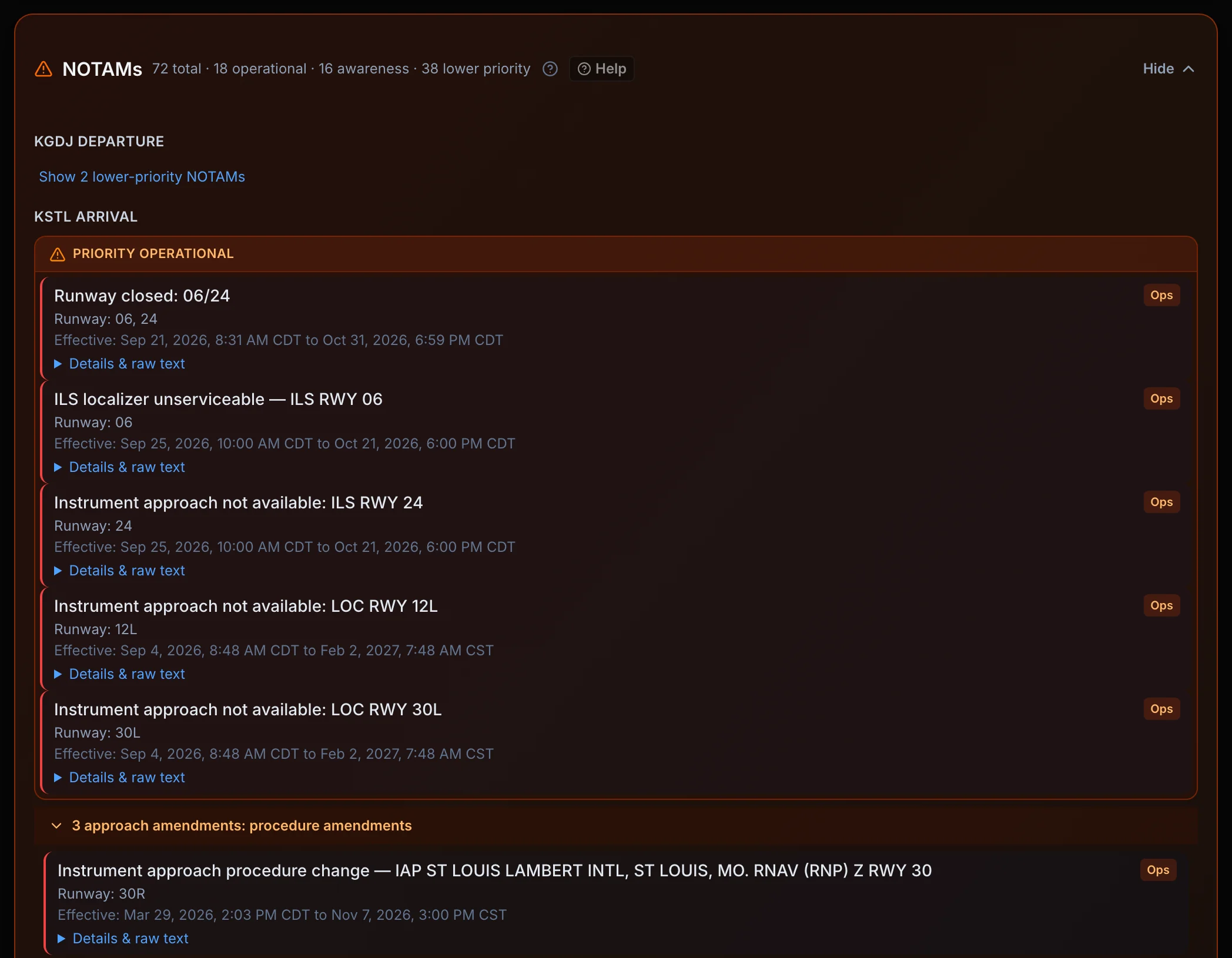
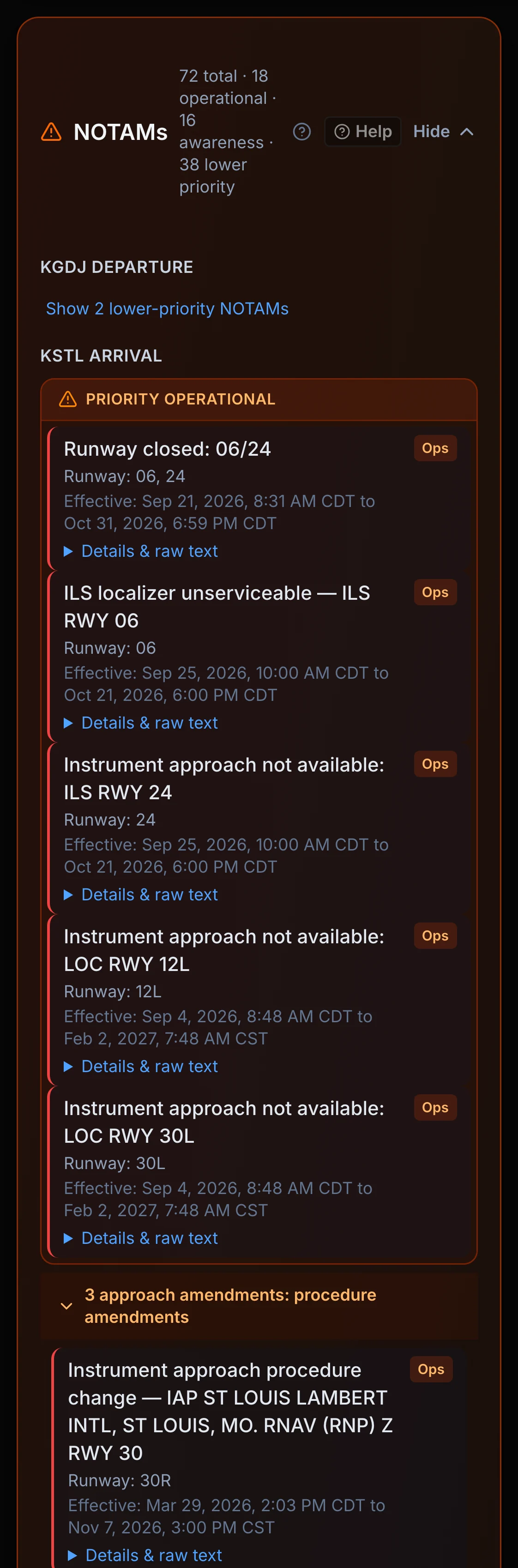
Remaining NOTAMs are classified into three tiers based on their Q-code and text content. Tier 1 (Operational) appears expanded at the top. Tier 2 (Awareness) follows. Lower-priority items are collapsed by default.
The Three Priority Tiers
These NOTAMs directly affect whether you can safely operate at the airport or fly the planned route.
- Runway closures (full or partial)
- Airport closures (CLSD)
- Active TFRs that close the airport
- ILS, LPV, or RNAV approach outages - especially for IFR flights
- GPS/RAIM outages at your planned approach altitude
- FICON / runway contamination at or below your aircraft's minimum RWYCC
- VOR or navaid outages on your route
- ATIS or ATC communication outages
These don't stop you from flying but require situational awareness - things that could affect your taxi, ground ops, or decision-making.
- Taxiway closures
- Tower, ASOS, or weather equipment outages
- Airspace restrictions (altitude-limited, not airport-closing TFRs)
- Obstacle lighting outages (cranes, towers) near the airport
- Approach lighting or PAPI outages
- Fuel availability issues
Administrative, informational, and low-impact NOTAMs that are available but collapsed by default. Examples: chart corrections, procedural amendments with no operational impact, bird activity advisories, noise abatement reminders.
In daylight, PAPI and runway lighting outages also move here. At night they stay in Awareness, and obstacle lighting outages move up to Awareness. Each airport is judged at its own time: the departure airport at the departure time and the destination at the arrival time. Night is from the end of evening civil twilight to the start of morning civil twilight, the same rule the FRAT and the briefing use.
Approach Procedure Grouping
At airports with many runways (KLAX, KORD, KDFW), procedure NOTAMs pile up fast. PlaneWX groups approach amendments (IAP, AMDT) by runway direction - east-facing vs. west-facing, north-facing vs. south-facing - so you only expand the group for the runway complex you'll actually use.
Example: At KLAX with 30-knot westerly winds, you'll be landing on 24L, 24R, or 25L. The "Rwys 19-36 family" group collapses the east-facing runway NOTAMs while expanding the west-facing group - the one that matters for your landing.
FICON & Runway Contamination
When a FICON NOTAM (or a Canadian RSC - Runway Surface Condition - report) is active, PlaneWX renders a dedicated Field Condition card showing the RWYCC (Runway Condition Code) for each runway surface on a 0-6 scale.
RWYCC Scale
RWYCC below your minimum - Shown prominently
If the reported RWYCC is at or below your aircraft's minimum RWYCC setting (configured in your Aircraft Profile), a clear warning is displayed in the NOTAMs & TFRs card. NOTAM-based score impacts are temporarily paused while the classifier matures - the FICON card shows the full report.
RWYCC above minimum - Shown for awareness
RWYCC values above your hard minimum are displayed in the Field Condition card so you can assess runway state before departure.
Configure your hard and soft RWYCC thresholds in Aircraft Profiles. If no thresholds are set, FICON is displayed for awareness only and does not affect your score.
NOTAMs and Your WX Score
NOTAMs are currently shown for situational awareness only
Your WX Score reflects weather conditions only. NOTAMs are displayed in full - closures, approach outages, FICON/RWYCC, GPS/RAIM windows - but they do not currently add deductions or trigger a 0%. We're still tuning the NOTAM classifier to make sure it handles complex schedules (nightly closures, DLY NOTAMs, partial restrictions) correctly before it influences your score.
Tier 1 NOTAMs that could affect your operation are surfaced prominently in the NOTAMs & TFRs card, regardless of whether they affect the score.
TFRs - What PlaneWX Shows (and Doesn't)
TFRs (Temporary Flight Restrictions) deserve special handling because there can be dozens active at any time - Presidential movement, stadium TFRs, fire suppression, disaster areas - and most are irrelevant to your specific flight.
Airport-closing TFRs - Always Shown Prominently
If a TFR closes your departure or destination airport entirely during your flight window, it appears prominently at the top of the NOTAMs & TFRs card. NOTAM-based score impacts are temporarily paused, so this does not drive your WX Score to 0; the operational restriction is still listed.
TFRs Along Your Route - Listed Individually
PlaneWX checks active FAA TFRs against your route corridor and flight times. TFRs within 10 NM of your route are listed with their floor, ceiling, active times, and altitude overlap; TFRs within 25 NM are listed under a collapsed Nearby section. Every listed TFR links to tfr.faa.gov for full detail. TFRs in Your Briefing (/help/tfrs) covers the full picture.
Canadian Airport Coverage
For flights to or from Canadian airports (CY-prefix ICAOs), PlaneWX fetches NOTAMs live from the Nav Canada public NOTAM service at briefing time. Canadian RSC (Runway Surface Condition) reports use the same RWYCC 0-6 scale as US FICON NOTAMs and are rendered in the same Field Condition card.
Coverage: Major Canadian airports (CYVR, CYYZ, CYUL, CYYC, CYEG, CYWG, and ~75 others) are seeded nightly. For smaller Canadian airports not yet in the database, NOTAMs are fetched live on demand. That may add a second or two to briefing generation.
Departure procedures: Nav Canada DEP PROC / SID / ODP closed notices stay in the procedure bucket. They are not scored as an instrument approach outage.
Important Limitations
- •PlaneWX NOTAM data comes from the FAA NMS and Nav Canada public feeds.
- •Under 14 CFR 91.103 the PIC is responsible for all available information for the flight. NOTAMs and TFRs can change after this briefing was generated. Live NOTAM and TFR sources include 1800wxbrief.com, EFBs, FAA NOTAM Search, and dispatch services.
- •NOTAM data may be delayed by up to 30 minutes due to caching. Time-sensitive NOTAMs (pop-up TFRs, emergency airspace) are available from ATC or a live briefing for current status.
- •European and other international NOTAMs are not yet supported.
Have ideas to make NOTAMs even better? Click the Feedback button in the navigation - we read every submission.