Density Altitude Caution
How PlaneWX surfaces high density altitude at departure and arrival: a hard-to-miss caution at the top of your briefing, with Terminal Weather and Gotchas for detail.
What you will see
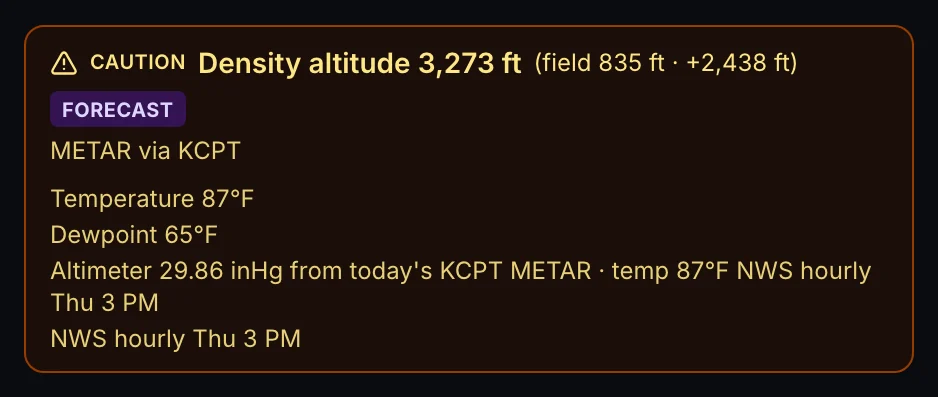
Density altitude alone does not deduct WX Score points. Instead, when DA is elevated, PlaneWX shows a colored caution at the top of the briefing (same band as other hard-to-miss alerts, above the score dial):
- Red when the warning level is warning or critical:
- DA from 5,000 to 6,999 ft and delta from field at or above 1,000 ft (warning)
- DA at or above 7,000 ft and delta from field below 1,000 ft (warning)
- DA at or above 7,000 ft and delta from field at or above 1,000 ft (critical)
- Yellow when the warning level is caution:
- DA from 3,000 to 4,999 ft and delta from field at or above 1,500 ft
- DA from 5,000 to 6,999 ft and delta from field below 1,000 ft
- No banner when DA is fine (normal / missing). Silence means pass (never a green “DA OK” box). Below 3,000 ft DA is always normal. From 3,000 to 4,999 ft with delta below 1,500 ft is also normal.
Exception: aircraft with runway performance math (today: TBM 900 after weight and fuel). Those types can still take a WX Score hit when calculated runway criteria fail (POH distance exceeds available runway). High DA by itself still does not ding the score.



Where the numbers come from
- Within 6 hours of departure: METAR temperature, dewpoint, and altimeter at the airport (or labeled proxy METAR).
- More than 6 hours out: NWS hourly forecast temperature and dewpoint at your scheduled departure or arrival hour, paired with the most recent METAR altimeter when available.
The density altitude calculation uses field elevation, temperature, dewpoint, and altimeter setting. Terminal Weather callouts name those inputs and whether the value is observed or forecast, so you can punch the same numbers into your own DA calculator or POH performance tables.
Where to see it in the app
Top caution banner
Red or yellow strip above the WX Score dial when DA is elevated. Missing banner means DA is fine.
Terminal Weather
Departure and Arrival cards show density altitude, delta above field, and the temperature, dewpoint, and altimeter inputs used.
Gotchas
High-DA trips surface a gotcha reminding you to verify takeoff, climb, approach, and landing performance per your POH.
What this is not
Not a WX Score deduction for DA alone. The caution banner is the don't-miss layer. Score breakdown should not list “Density Altitude” points unless runway performance criteria failed for a type that runs that math.
Not runway-length math for every aircraft. Most types get the environmental caution only. Verify takeoff and landing distance in your own POH.
Not a hard stop by itself. Density altitude alone does not zero your score.
Example
A summer leg from a low-elevation departure to a mountain destination (for example KGEU to KTEX) might show:
- Red banner at the top: arrival density altitude in the critical range
- No Density Altitude line in the WX Score breakdown
- Terminal / Gotchas still list the DA numbers and POH reminder
Related help
- WX Score Explained (full deduction list and status bands)
- WX Score: How It Works (comfort vs. hard limits and caps)
- Aircraft Profiles (capability settings that interact with performance planning)
Pilot in command. PlaneWX gives you the confidence to go. The courage to stay. But only you can verify takeoff and landing performance against your POH, weight, runway, and technique.