FRAT
PlaneWX FRAT is a dynamic flight risk assessment, not a static one-time form. It reads your high-quality WX briefing, airport complexity, day/night, unfamiliar destination, and risk stacking. It is built on the FAA PAVE checklist (Pilot, Aircraft, Environment, External). PlaneWX fills what it already knows, shows overrides, and keeps the score a pilot self-assessment.
What Is FRAT?
FRAT stands for Flight Risk Assessment Tool. In PlaneWX it is the in-app surface you complete near departure. Unlike a paper checklist you fill once, PlaneWX FRAT stays dynamic with the trip: weather, airport complexity, day/night, unfamiliar destination, and stacked risks feed the picture. Underneath, the four buckets follow the FAA PAVE checklist:
P - Pilot
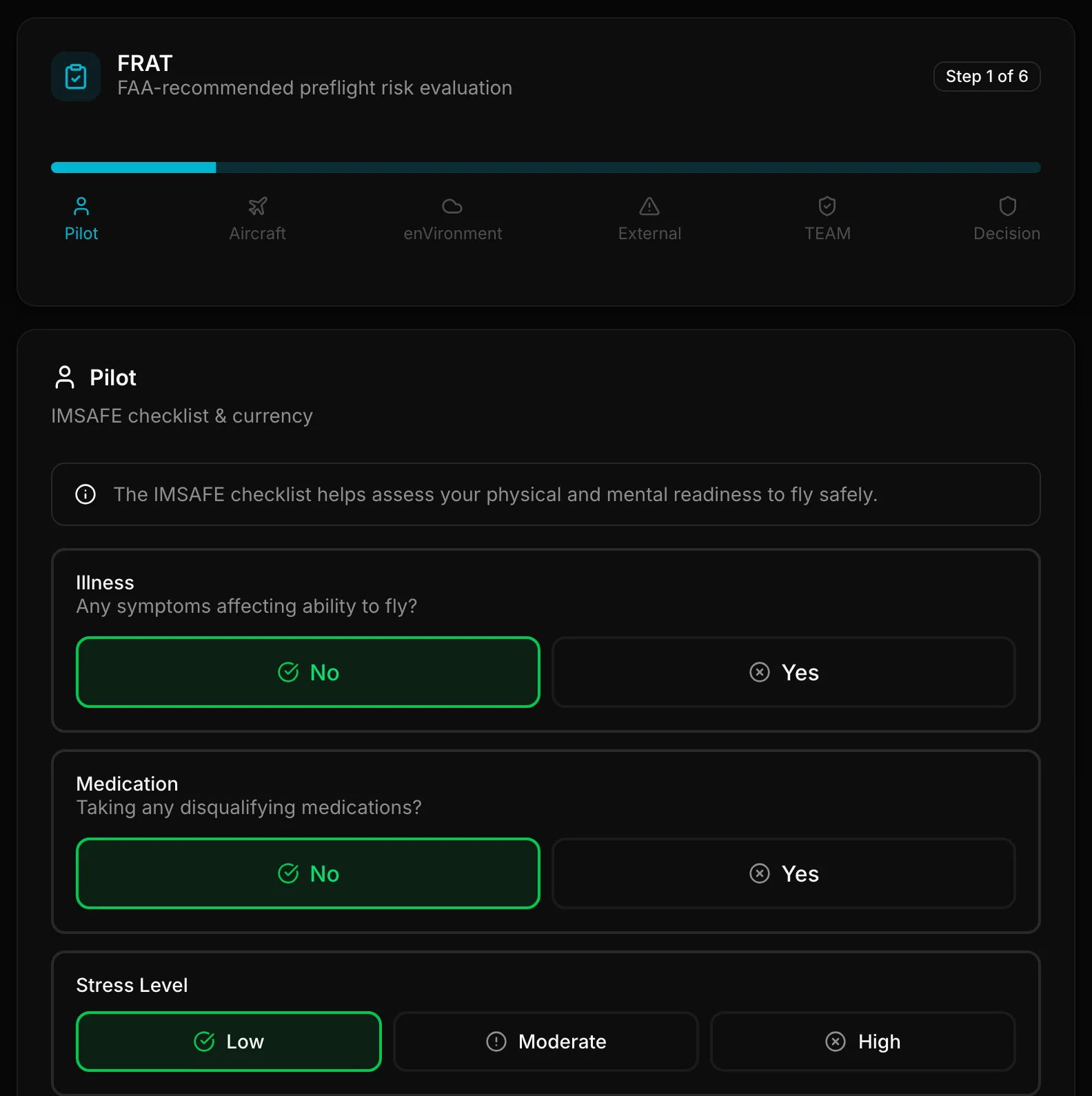
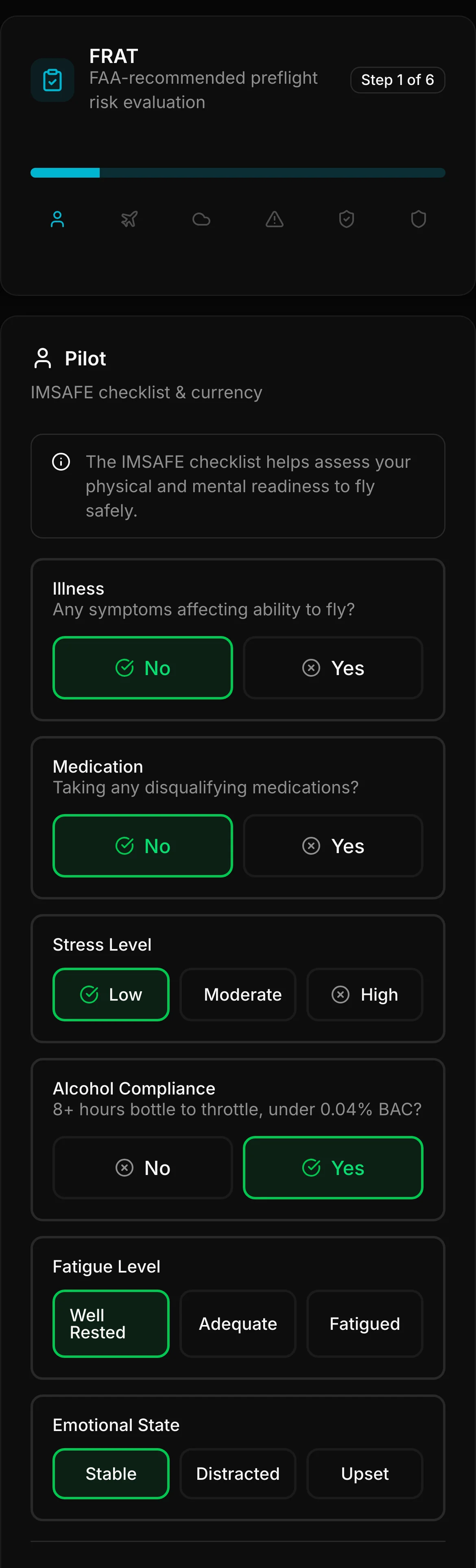
IMSAFE readiness plus currency from your profile (with override)
A - Aircraft
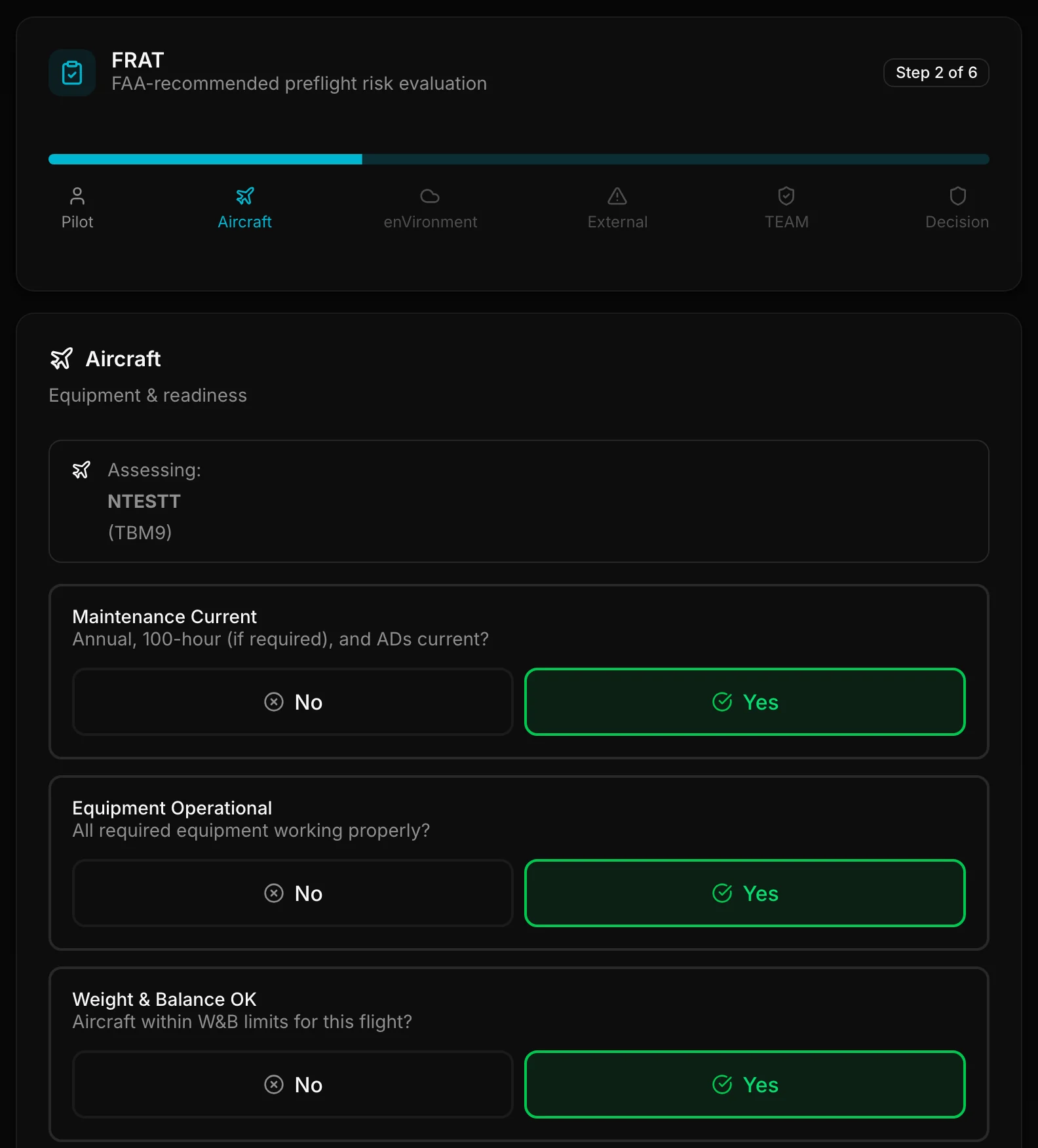
Squawks, fuel, equipment, runway fit notes, and your Aircraft self-rate
V - Environment
Weather and WX Score as hints, day/night, airport complexity chips, item self-rates, and your Overall Environment self-rate
E - External
Optional pressure chips, explicit get-there-itis, and your External self-rate
Deduce First, Then Self-Rate
PlaneWX pre-fills facts it already knows (recent hours, night currency, weather snapshot, airport class/tower/volume when available). Those facts are hints. Your LOW / MEDIUM / HIGH self-rates feed the FRAT category scores. This is not a second WX Score engine.
At the bottom of each category, PlaneWX shows a suggested risk level and what is driving it. Then it is your call: rate overall Pilot, Aircraft, Environment, or External Pressure risk. The form states: “Your rating overrides the PlaneWX suggestion.” Soft-prefilled complexity rates are suggestions you can change.
Pilot, Aircraft, and External each have an overall self-rate that replaces that category's computed hint when you set it. Environment works the same way: item self-rates (weather, night, origin/destination complexity, terrain) first compute a category level from the highest item. Your overall Environment self-rate, when set, replaces that computed level.
If you rate weather risk more optimistic than the WX Score hint (for example LOW when the hint is HIGH), the form asks for a short note such as a deviation plan or diversion already picked.
Feeling Ready to Fly?
Open the optional recall quiz from the link at the top of the FRAT page: “Ready to fly? Take our quiz to assess your readiness”. Tapping it opens a pop-up. It is not inline questions inside the Pilot step. The quiz is available to every pilot. About 15 questions, under two minutes. Skip and close are always available. The quiz never opens by itself.
The quiz changes no score. It does not feed the Pilot Risk Level, the FRAT overall level, or the WX Score.
Questions are recall, not how-you-feel. Each answer is checked against an expected value from your personal minimums, this briefing, or generic boldface. After you save, each answer is shown next to the expected value as a fact. There is no pass, fail, or grade.
Your answers are visible only to you. They are not shared with crew, trip watchers, mentors, or your public profile. You can delete any check. No audio is recorded.
History shows your last 3 checks on every plan, and up to 10 on Pro Plus and during a trial.
- Personal minimums: IFR ceiling, VFR visibility, crosswind soft and hard limits
- Briefing facts: filed altitude, ETE, destination ceiling and field elevation (four choices each)
- Generic boldface: engine out after rotation, 7700, 7600, and 121.5
- Shorter quiz when some of that data is missing (“Fewer questions today.”). Not type-specific.
- After save: “Matched N of M. Your usual...” when enough prior checks exist. Facts only.
- Any item can stay blank.
FAA sources for the boldface items (quiz questions on engine out, 7700, 7600, and 121.5):
- Engine out after rotation: Airplane Flying Handbook (FAA-H-8083-3), takeoffs and departure climbs / emergency procedures; also the aircraft AFM or POH for type-specific boldface.
- Emergency squawk 7700: Aeronautical Information Manual (AIM) Chapter 6, emergency and urgency communications (transponder codes for distress).
- Lost communications squawk 7600: AIM 6-4-1, two-way radio communications failure.
- Guard frequency 121.5 MHz: AIM Chapter 6, distress and urgency communications; VHF emergency frequency.
Fatigue Right Now and at Departure
The Pilot step asks two fatigue questions: “Fatigue right now” and “Fatigue you expect at departure”, each Well Rested, Adequate, or Fatigued.
When the two answers differ, the form shows both as a fact, for example “Now: Fatigued. Expected at departure: Rested.”
The worse of the two answers is the Fatigue value used for the Pilot suggestion, saved FRAT history, and your Self Debrief. Older FRATs with one fatigue answer read the same as before.
Fatigued and the Pilot Suggestion
When Fatigue is Fatigued, the Pilot suggestion is at least Medium. Fatigued alone suggests Medium.
Fatigued suggests High when it comes with another elevated Pilot factor (illness, medication, moderate or high stress, distracted or upset, or alcohol not compliant) or with a complex flight. A complex flight is an arrival ceiling below 1,000 ft or visibility below 3 SM, or two or more of: IFR or LIFR at departure or arrival, night or mixed day and night, an unfamiliar field, and terrain noted. Currency is not counted as a Pilot factor for this.
This never lowers a level. If the Pilot suggestion was already High, for example from currency, it stays High. The suggestion shows the reason as a fact, for example “Fatigued with high stress” or “Fatigued on a complex flight: night, unfamiliar field”.
Your Pilot self rate still replaces the suggestion when you set it. The Pilot level feeds the FRAT overall level. The WX Score does not change. Readiness quiz results are not used.
Readiness check reminder
From 90 to 15 minutes before departure, an optional banner can appear on the trip card and the briefing when your FRAT is more than 3 hours old at that time: “Readiness check reminder. Optional.”
The re-check asks fatigue right now, fatigue expected at departure, stress, illness, emotion, and whether you are excited to fly. Your original FRAT answers, your self rates, and the saved levels are kept as they were.
After a re-check, the Pilot suggestion is shown twice, each with its time: once from the answers in your saved FRAT and once with the re-check answers, for example “Pilot suggestion from your FRAT saved at 2:38 PM CDT: Medium. With this re-check at 7:38 PM CDT: High.” Your self rate and your decision stay yours. Skip and Dismiss are one tap; a skip is recorded as a fact only, and Dismiss hides the banner for that trip.
Push: one push per trip at most, only if you turn on “Readiness check reminder” in Profile notifications. It is off by default. When sent, it arrives between 90 and 15 minutes before departure and is not sent within 20 minutes of a preflight message.
Why fatigue is asked twice: “Self-rated fatigue can stay the same while performance drops” (FAA CAMI report DOT/FAA/AM-26/15, 2026). That study looked at helicopter air ambulance pilots, not general aviation pilots.
When Is FRAT Available?
Available within 4 hours of departure
FRAT is designed to assess your current state: physical, mental, and situational. Completing it the night before would not accurately reflect how you will feel at start-up. The 4-hour window keeps the self-assessment honest and timely.
When your departure is within 4 hours, you will see a Start FRAT option in your briefing. The form stays available until 24 hours after departure whether or not you started it, so you can still complete it.
The IMSAFE Checklist (Pilot)
The Pilot section uses the IMSAFE checklist to assess your fitness to fly:
Currency Lives on Your Profile
Night and instrument currency are deduced on My Flights, then Insights and your Pilot profile, then reused in FRAT with an override. Night currency is only a risk factor when any part of the padded leg window (ETD minus 1 hour through ETA plus 1 hour) falls in civil twilight or dark at departure or arrival; otherwise FRAT shows “Not needed: daylight flight” and adds no night-currency points. Time in type stays on Pilot currency (not the Aircraft risk score). Instrument currency still needs your confirm because holds are not logged in PlaneWX.
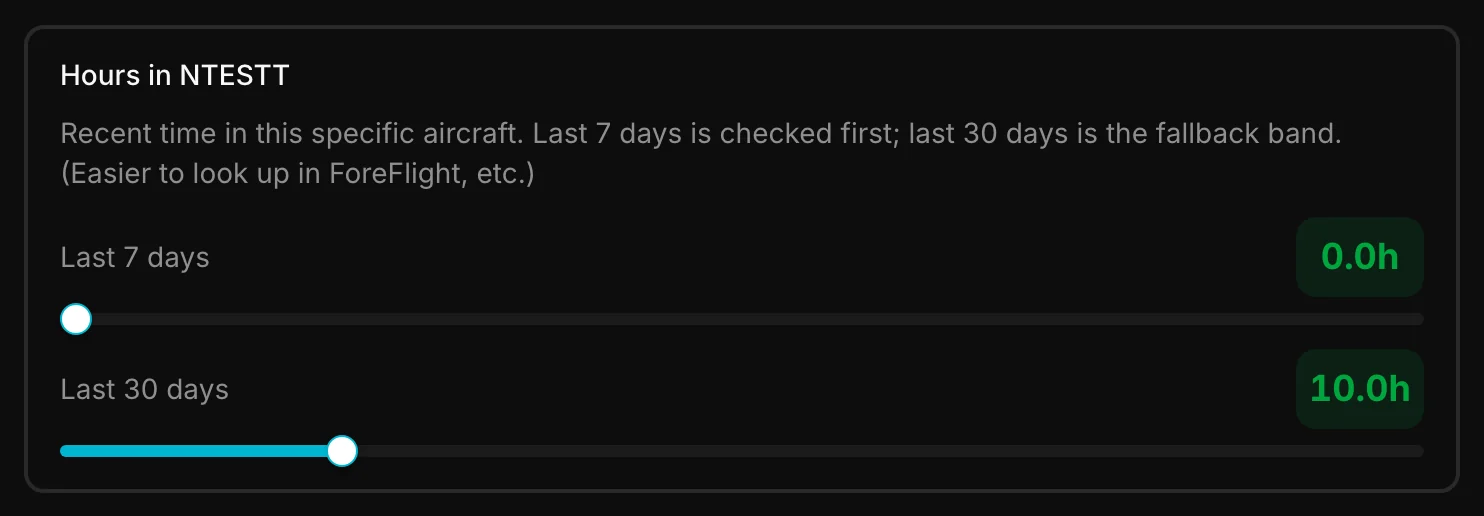
Auto-filled from your flight history
Hours in this aircraft for the last 7 days and last 30 days pre-fill from ADS-B-confirmed flown trips for that tail number (one decimal, e.g. 5.6h). The 7-day total is checked first (at or above 2.0 hours adds no recent-flights risk points); otherwise the existing 30-day bands apply. Drag either slider to override (0 to 50 hours). Once you edit a value, it is kept for that assessment and the 7-day override is what drives the short-circuit.
Aircraft: Runway Notes
When runway lengths and your aircraft minimum runway are known, FRAT shows an OK or short/tight runway note for origin and destination. That is a hint for your Aircraft self-rate. PIC still runs performance (weight and balance / AFM). Missing lengths stay silent rather than inventing short.
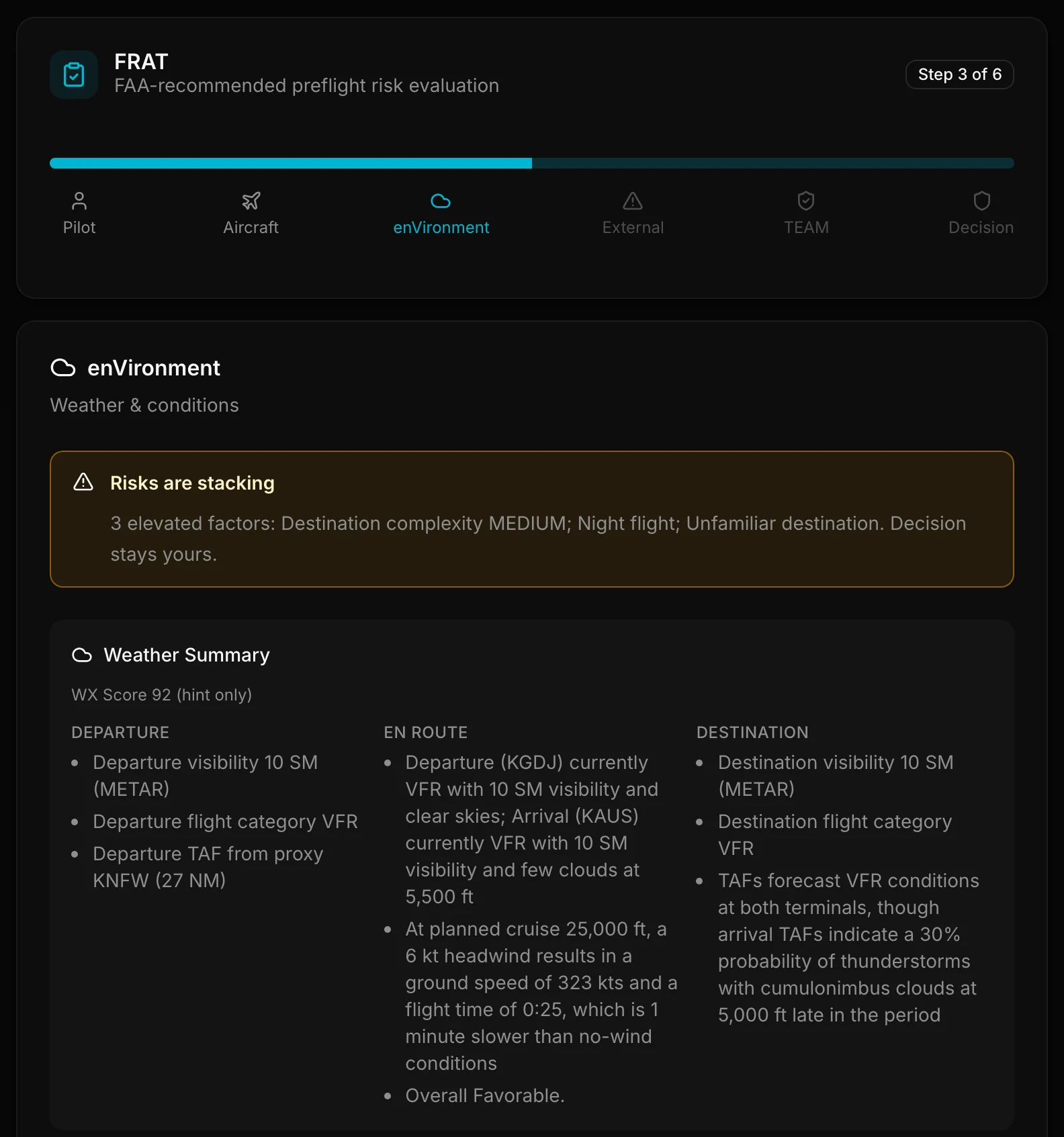
Environment: Weather and Day/Night
- Readable weather summary with Departure, En route, and Destination columns (each column always shows; a plain fallback line appears when that section has nothing notable)
- WX Score breakdown deductions with points (hint only)
- Your weather self-rate for this flight
- Day/night deduced from planned dep/arr local sun times (override allowed); night is from the end of evening civil twilight to the start of morning civil twilight at each airport, the same rule the briefing uses; night risk self-rate when night applies
- Light terrain self-rate (full terrain databases are out of scope for this release)
- Overall Environment self-rate that replaces the highest item level when you set it
Environment: Airport Complexity (not weather)
Origin and destination can show airport complexity chips that are separate from the weather briefing. They help you self-rate Environment complexity. They never change the WX Score and never inject Airport Busyness into weather briefing copy.
Traffic volume (busyness)
When PlaneWX has an OPSNET or TAF master row for the airport, you may see a traffic volume chip: Low traffic, Moderate traffic, High traffic, or Very high traffic (zoo-level hubs). Tier comes from published annual operations, not from inventing how busy a field "feels." Traffic chips inform Environment complexity self-rates (busier fields often mean more radio, sequencing, and go-around awareness). Complexity self-rates may soft-fill from these chips as a suggestion you can change.
SID/STAR procedure load
When procedure counts are known, chips show No SID/STAR, Few SIDs/STARs, or Many SIDs/STARs. Few means a light charted procedure set (about 1 to 5 combined). Many means a denser SID/STAR environment. That is about procedure complexity for your self-rate, not a clearance you must fly.
Seasonal traffic heat
For some OPSNET-covered airports, PlaneWX can show Seasonally busy this month when that month runs hotter than the airport's own average. It is a seasonal heads-up for complexity, not a weather forecast.
Training-heavy
When an airport is flagged training-heavy, you may see a Training-heavy chip. Expect denser pattern and training traffic when you self-rate complexity.
Silence when we do not know
If there is no master row, or no OPSNET/TAF source for volume, PlaneWX stays silent on those chips. The same is true for missing SID/STAR counts and seasonal index. Silence is intentional. We never invent busy or traffic copy to fill a gap. Class B / Towered can still appear from static airspace lists even when volume chips are silent.
FRAT chips only
Airport busyness, procedure load, seasonal heat, and training-heavy feed FRAT Environment chips and your complexity self-rate only. They do not change the WX Score and do not appear as traffic copy in the weather briefing.
Unfamiliar Destination Evidence
FRAT can pre-answer unfamiliar destination from your home airport and marked-flown arrivals to that field. You see the count (and home callout when it applies) and can override. That evidence is for your judgment; it does not change the WX Score.
Risks are Stacking
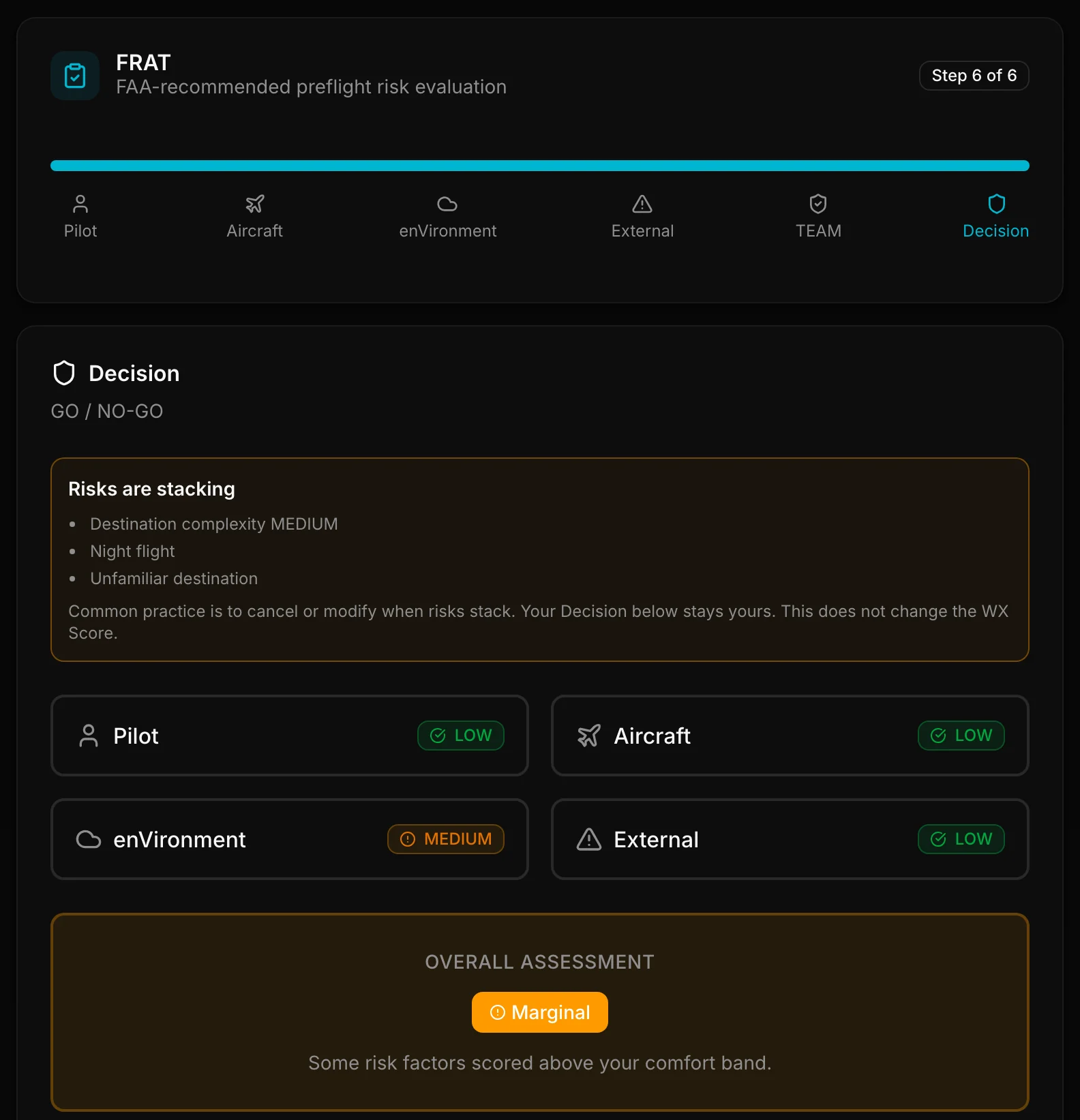
When three or more elevated factors stack on this flight (self-rates and named concerns on the FRAT card), PlaneWX shows a Risks are Stacking banner. It does not change the WX Score or your FRAT levels. Your Decision stays yours.
The banner line reads “N elevated factors:” followed by up to 4 factor names. When there are more, a +K more button follows them. Tapping it opens a list of every elevated factor; tapping it again closes the list.
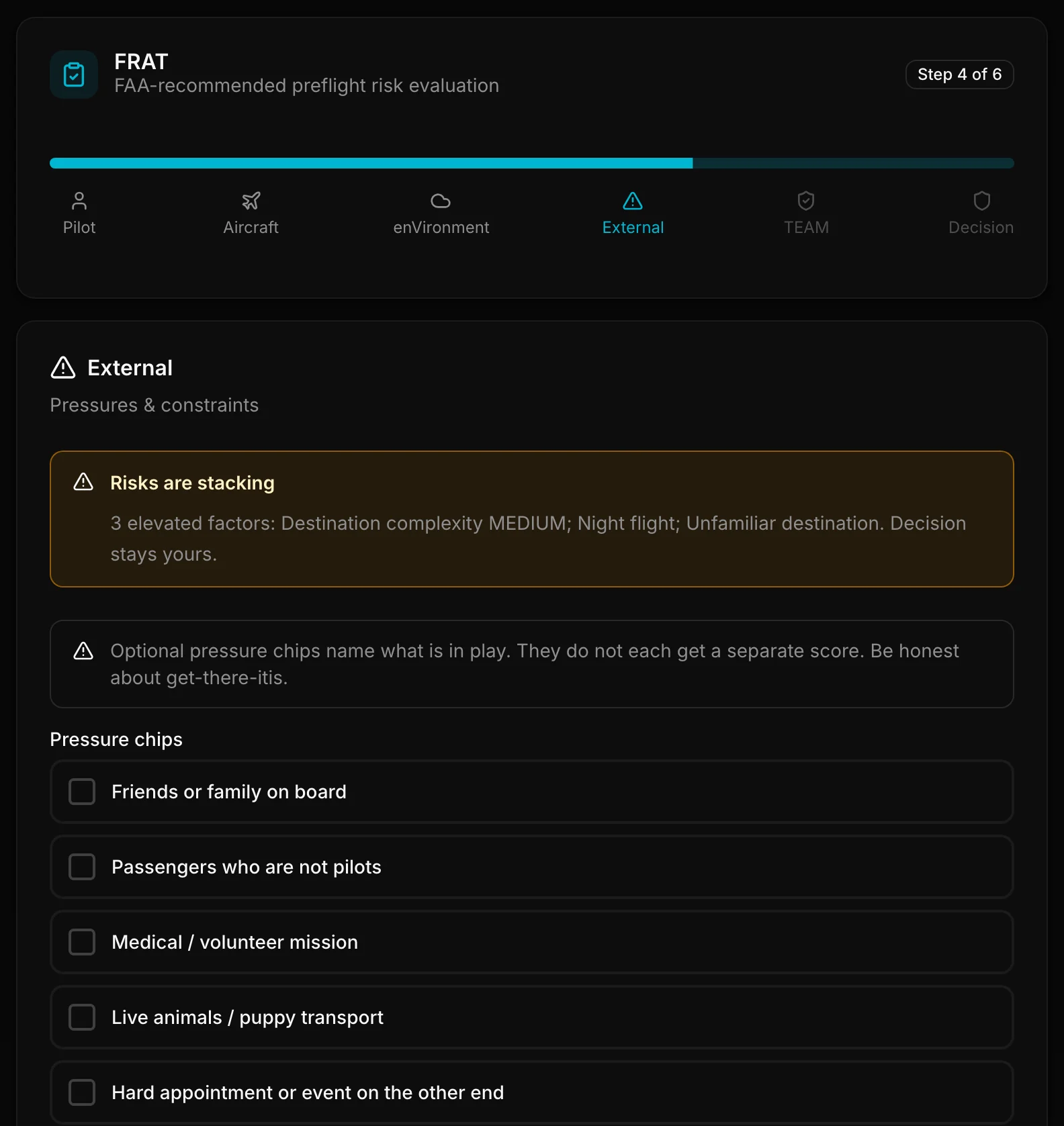
External Pressure Chips
Optional multi-select chips name pressure (friends or family, non-pilot passengers, medical/volunteer missions, live animals, hard appointments, work, financial, or other). Get-there-itis is an explicit Yes/No. Chips do not each get a separate score; you self-rate overall External LOW / MEDIUM / HIGH. When the effective External level is MEDIUM or HIGH (your rating if set, otherwise the PlaneWX suggestion), add a short note on what you will do.
Understanding Risk Levels
Each FRAT category is evaluated and assigned a risk level:
LOW Risk
No significant concerns in this category
MEDIUM Risk
Some concerns in this category
HIGH Risk
Significant concerns; one or more factors exceed limits in this FRAT
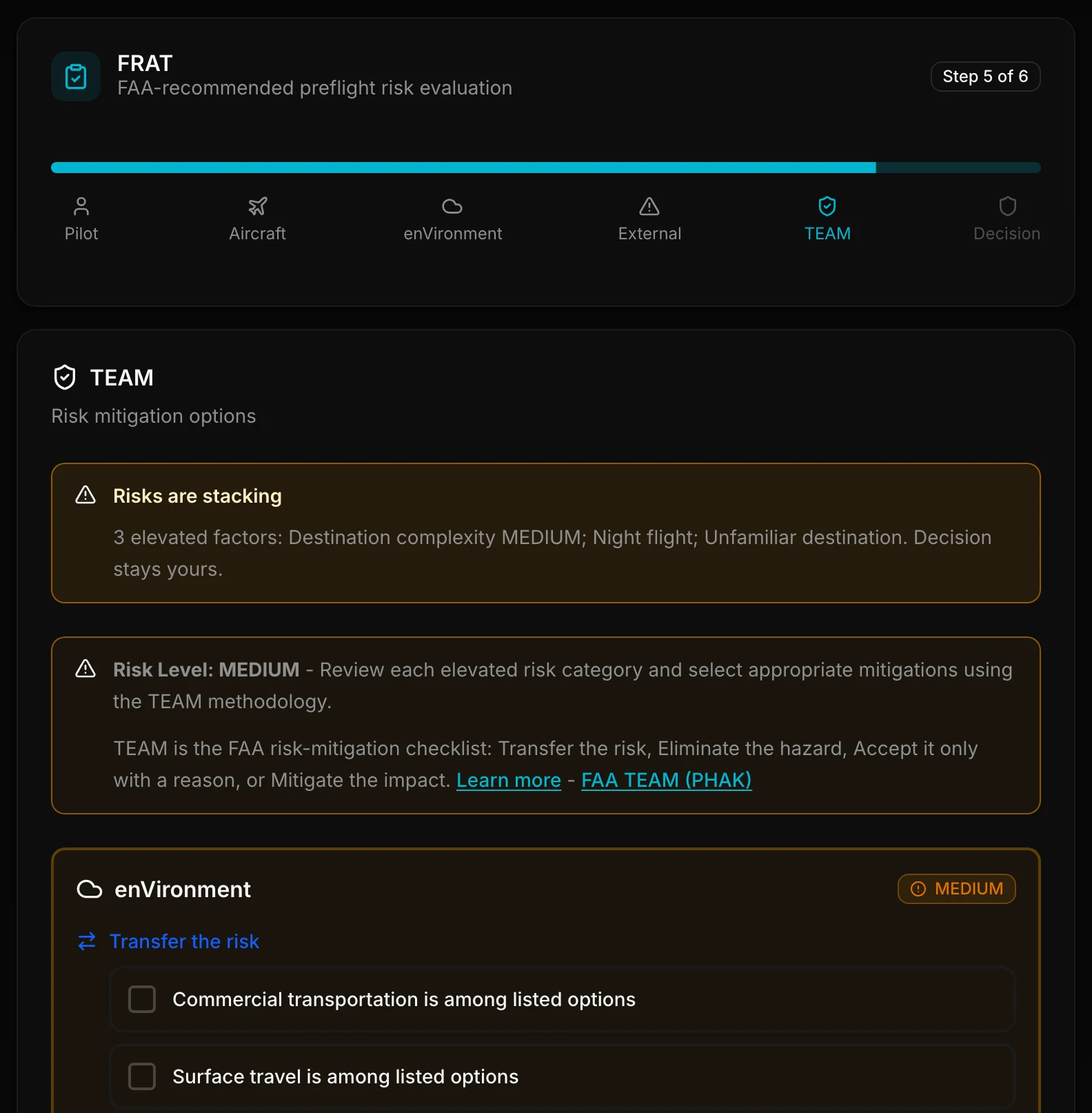
TEAM Mitigations
TEAM is the FAA risk-mitigation checklist: Transfer the risk, Eliminate the hazard, Accept it only with a reason, or Mitigate the impact. When overall risk is MEDIUM or HIGH, PlaneWX prompts these choices. Answers are stored so checkboxes reload after save. Path to Favorable and Flight Window may appear as suggested Mitigate choices when available.
Recording Your Decision
After completing the assessment, you record your final decision. PlaneWX never recommends GO or NO-GO. You make the call as PIC:
- GOFlight continues as planned
- NO-GOFlight does not launch. After a NO-GO, the FRAT result offers a Cancel Trip card. Same-day linked legs can be included, and a cancelled trip can be restored from Past, with its linked legs offered unticked.
- PostponeDeparture moves to a later time
- ModifyPlan changes (different route, altitude, etc.)
Your completed assessment is saved and can be reviewed later. Casual, Pro, Pro Plus, and Enterprise pilots can also see those decisions on WX Score History.
After you land, Self Debrief asks how that FRAT picture compared to what you felt in the airplane. It does not change the WX Score.
FRAT Before Departure
FRAT unlocks in the last 4 hours before departure. Complete it in the app. PlaneWX does not send a Final Pre-Flight Briefing email with your FRAT or a FRAT link.
FRAT nudge (iOS push)
If you have not completed FRAT yet and you are within 4 hours of departure (and still before departure), PlaneWX can send an iOS push reminding you to finish the assessment (Profile, then Notifications: FRAT reminder). That nudge is separate from the pre-flight check push that can fire 20 to 35 minutes before departure with your WX Score. In-app FRAT reminders can be toggled in your profile under risk assessment preferences.
FRAT is the second beat of the risk loop: after the Weather Briefing, before GO / NO-GO. PlaneWX never recommends GO or NO-GO. You make the call as PIC.
Why FRAT Matters
Weather is just one part of flight safety. A clear day can still be dangerous if you are fatigued, the aircraft has a maintenance issue, or you are under pressure to make it work. FRAT helps you step back and review the complete picture before the flight decision.